Sunday, 28 January 2018

my web

My Web Login


Email


Password


Remember Me.

© aSecurity Copyright 2018

Html Editors

Web pages can be created and modified by using professional HTML editors.
However, for learning HTML we recommend a simple text editor like Notepad (PC) or TextEdit (Mac).
We believe using a simple text editor is a good way to learn HTML.
Follow the four steps below to create your first web page with Notepad or TextEdit.

Step 1: Open Notepad (PC)

Windows 8 or later:
Open the Start Screen (the window symbol at the bottom left on your screen). Type Notepad.
Windows 7 or earlier:
Open Start > Programs > Accessories > Notepad

Step 1: Open TextEdit (Mac)

Open Finder > Applications > TextEdit
Also change some preferences to get the application to save files correctly. In Preferences > Format > choose "Plain Text"
Then under "Open and Save", check the box that says "Ignore rich text commands in HTML files".
Then open a new document to place the code.

Step 2: Write Some HTML

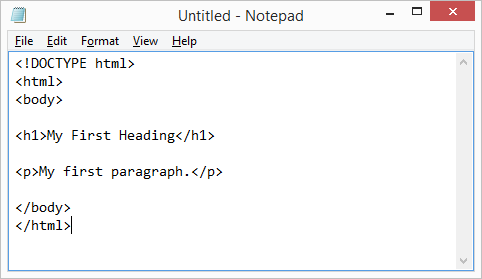
Write or copy some HTML into Notepad.
<!DOCTYPE html>
<html>
<body>

<h1>My First Heading</h1>

<p>My first paragraph.</p>

</body>
</html>
Notepad


Step 3: Save the HTML Page

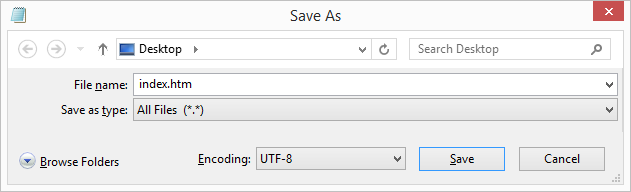
Save the file on your computer. Select File > Save as in the Notepad menu.
Name the file "index.htm" and set the encoding to UTF-8 (which is the preferred encoding for HTML files).
View in Browser
You can use either .htm or .html as file extension. There is no difference, it is up to you.

Step 4: View the HTML Page in Your Browser

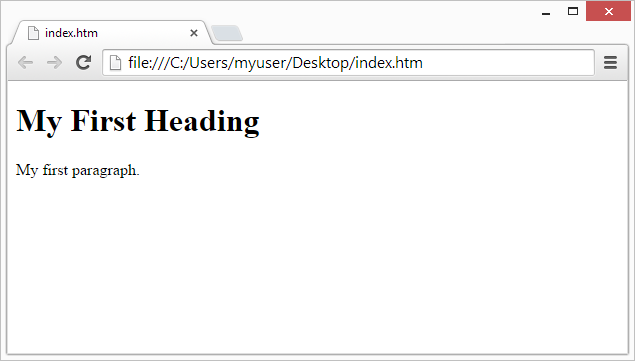
Open the saved HTML file in your favorite browser (double click on the file, or right-click - and choose "Open with").
The result will look much like this:
View in Browser

Saturday, 27 January 2018

WHAT IS AN HTML?

What is HTML?

HTML is the standard markup language for creating Web pages.
  • HTML stands for Hyper Text Markup Language
  • HTML describes the structure of Web pages using markup
  • HTML elements are the building blocks of HTML pages
  • HTML elements are represented by tags
  • HTML tags label pieces of content such as "heading", "paragraph", "table", and so on
  • Browsers do not display the HTML tags, but use them to render the content of the page

A Simple HTML Document

Example

<!DOCTYPE html>
<html>
<head>
<title>Page Title</title>
</head>
<body>

<h1>My First Heading</h1>
<p>My first paragraph.</p>

</body>
</html>

EXAMPLE OF AN HTML

<!DOCTYPE html>
<html>
<title>HTML Tutorial</title>
<body>

<h1>This is a heading</h1>
<p>This is a paragraph.</p>

</body>
</html>

HACK WHATSAPP?


Whatsapp Messenger is a cross stage texting application. Whatsapp Messenger is positively the most in fashionable instant electronic messaging application for smart phone today. WhatsApp Messenger is accessible for android, iPhone, BlackBerry, Nokia, Windows Phone and everyone today have whatsapp Messenger introduced on their shrewd phones. But as each bit of innovation accompanies a couple of escape clauses, so did Whatsapp Messenger.
Mobile
You may get to someone else's WhatsApp account through your cell phone, PC, or spyware. Observing an individual's discussions without consent is an infringement of security. Before you make any strides towards get to their WhatsApp account, approach the person for authorization.
Uninstall WhatsApp from your telephone or gadget. This will clear your own data from the application. You will reinstall it later and enter the individual's data rather than your own.
Find and record the individual's Media Access Control (MAC address). Each telephone is allocated a MAC address, a one of a kind identifier that serves as its online personality. Macintosh locations are a progression of six sets of letters or potentially numbers isolated by colons. For instance: 01:23:45:67:89: ab, 00:0a:95:9d: 68:16, and 00-14-22-01-23-45.
·         Android: Open "Settings". Select "About telephone" then "Status". Record the deliver to one side of "Wi-Fi MAC address".
·         iPhone: Launch "Settings" and select "General". Click "About". Record the deliver to one side of "Wi-Fi Address".
·         Windows telephone: Click "Settings" then "About". Click "More information". Record the deliver to one side of "Macintosh address". Record the address.
·         BlackBerry: Select "Choices" then "Gadget". Click "Gadget and Status data". Record the deliver to one side of "WLAN MAC".
Find and record your MAC address. With a specific end goal to get to the individual's WhatsApp account, you should swap their MAC address for yours. When you are done survey their record, you should supplant their MAC address with your own. Once you've found your MAC address, record it.
·         Android: Open "Settings". Select "About telephone" then "Status". Record the deliver to one side of "Wi-Fi MAC address".
·         iPhone: Launch "Settings" and select "General". Click "About". Record the deliver to one side of "Wi-Fi Address".
·         Windows telephone: Click "Settings" then "About". Click "More data". Record the deliver to one side of "Macintosh address". Record the address.
·         BlackBerry: Select "Choices" then "Gadget". Click "Gadget and Status information". Record the deliver to the privilege of"WLAN MAC".
Introduce applications that will give you a chance to change your telephone's MAC address. Keeping in mind the end goal to sign into WhatsApp as someone else, you should supplant your MAC address with the individual's MAC address.
·         iPhone clients, first Install Cydia from the web. Once downloaded, open the application and scan for "system cmds". Tap on "system cmds" then "Introduce". Press "Affirm". Once downloaded, look for "Portable Terminal". Click "Versatile Terminal", trailed by "Introduce" and "Affirm".
·         Android clients, first root your telephone. At that point, download "BusyBox" and tap the application and introduce it. At long last, download "Terminal Emulator". These applications are free from the Google Play Store.
Utilizing Spy Software
Acquire authorization from the individual whose telephone you'll be observing. The applications that you'll be utilizing are proposed for guardians, life partners, or businesses to screen the movement of their kids, life partners, or representatives. They require that you utilize them just with earlier assent, so make a point to ask the individual whose telephone you need to screen and get their full authorization before you continue.
Pick an application or program to utilize. Spyware applications are intense - they will concede you about unlimited access to a man's electronic gadget. They are equipped for following somebody's area, checking a man's WhatsApp, and notwithstanding recording an individual's telephone calls. There are various distinctive applications or projects you can look over. Alternatives include:
·         FlexiSPY
·         Highster Mobile
·         mSpy
·         Phone Sheriff
Purchase and introduce the application. Once you've bought the application, introduce the spyware on your gadget. Keeping in mind the end goal to screen a man's cell phone, you should download the spyware application on their telephone as well.
Set up the application and begin following. Take after the application's directions to set up a record. In the wake of everything is set up legitimately, you will have the capacity to survey the individual's WhatsApp messages. You will likewise have admittance to their passwords, telephone calls, and instant messages.
·         If you need extra help, visit the Spyware's site.


Wednesday, 24 January 2018

Download Kinemaster pro for free?

Hello friend welcome here i m gonna to tell you how you can download free kinemaster pro.
Kinemaster is a video  editing app for android phones which is a best video editing app.If you are a youtuber you habe heard about it or you have used it for your video editing.
If you want to watch my video about how to download kinemaster pro for free click here
Watch Kinemaster pro Download


facebook
youtube
If you had downloaded kinemaster from playstore and puts its watermark in your videos and you didn't want this water mark in the videos then you have to buy kinemaster pro version.

But if you didn't want to buy and you want a free kinemaster pro then you are at right place.
If you have kinemaster pro already installed and did not support all features uninstall it and download the Green Kinemaster pro from the below link


The Green kinemaster pro supports all the features and all the layers
Download kinemaster pro here:

If download doesn't start or if your browser shows that this app is only 0 bytes then download it with google drive.


NOTE:- Thanks for visiting this blog if you have any issue plz comment below and if you want to learn ethical hacking follow this blog.To subscribe my youtube channel aSecurity visit aSecurity .To like my facebook page ASecurity visit Facebook/aSecurity

Tuesday, 23 January 2018

How to Unlock a Locked SIM Card Manually?

If your phone uses a SIM card to operate, you can activate a security feature called a SIM PIN. The SIM PIN protects your SIM card from unauthorized use, and must be entered in order to use your phone. Enter it incorrectly three times and your SIM card becomes locked. You can unlock your SIM card on your own, however, by typing in a PIN unlock key. Your carrier can provide you with the unique PUK code for your device.
1
Contact your wireless carrier by calling the toll-free customer service number. (Find this on your provider's website or a recent invoice.) You will need to verify your account password before the PUK code is released to you.
2
Power your phone on. You will see a "SIM Locked" or "Enter PUK" message. Type in the eight-digit PUK code and press "OK."
3
Type in a new four- to eight-digit PIN code when prompted, then press "OK."
4
Verify your new PIN code by re-entering it when prompted. Press "OK." Your SIM is now unlocked.

Warning


NOTE:- Thanks for visiting this blog if you have any issue plz comment below and if you want to learn ethical hacking follow this blog.To subscribe my youtube channel aSecurity visit aSecurity .To like my facebook page ASecurity visit Facebook/aSecurity

HOW TO UNLOCK PATTERN LOCKS ON ANDROID DEVICES?

How to Unlock Pattern Locks on Android Devices
Nowadays many android phone users use the inbuilt “pattern
locks” as a security to their phones. But the main problem with
it is that, if you forget the pattern you used and you try out
many wrong attempts, it gets locked permanently. So, just
follow these simple steps to unlock pattern locks on your
android device and use it again free of cost.
Steps to be followed :
Unlock using Google Account :
If you don’t have data connection or internet access or if you
don’t have your google account linked to your phone, then, you
can skip this step and refer the Additional TRICK.
When you try different patterns and unable to unlock your
phone in five attempts. Then a message pop-up and shows
two buttons “next” and “try again”. Now click on “next” button
and you see two options for unlocking phone. One is answer
the security question and the second option is to provide
Google account details.
Mostly people don’t set a security question. But if you set it
then simply answer the question and unlock your device
quickly. Otherwise check the Google account option and click
“next”.Now provide your Google account username and
password attached with your device and click on “sign in”.
After that you are directed to choose new pattern and now
you can unlock with this pattern.
Additional TRICK:
NOTE:
This method deletes all your data and apps.
The following steps are intended for both rooted and non-
rooted android devices. For rooted phones, patterns can be
unlocked even without factory reset which we will be updating
later on after thorough verifications.
1) Switch off the phone.
2) Now hold these buttons all together at the same time
“Volume up + Home Key + Power Button”
until the phone boots (if you device doesn’t have a home
button just hold together volume up key and power key)
3) Now a screen like DOS will come up with different options
4) Use the volume key to move up and down then scroll down
to “Restore Factory Defaults” or “Delete all User Data”
depending on which is on your device. Select this factory reset
option and then press power button to let the action begin.
Now it asks you for confirmation, select “yes”.
5) After clicking on the settings above, now scroll down to
“Reboot System Now” and wait for your phone to reboot
(restart).
Now your phone will reboot and all lock patterns have been
removed and your device will now in its default settings.


NOTE:- Thanks for visiting this blog if you have any issue plz comment below and if you want to learn ethical hacking follow this blog.To subscribe my youtube channel aSecurity visit aSecurity .To like my facebook page ASecurity visit Facebook/aSecurity

Monday, 22 January 2018

Kali Linux Hard Disk Install

Kali Linux Installation Requirements

Installing Kali Linux on your computer is an easy process. First, you’ll need compatible computer hardware. Kali is supported on i386, amd64, and ARM (both armel and armhf) platforms. The hardware requirements are minimal as listed below, although better hardware will naturally provide better performance. The i386 images have a default PAE kernel, so you can run them on systems with over 4GB of RAM. Download Kali Linux and either burn the ISO to DVD, or prepare a USB stick with Kali Linux Live as the installation medium. If you do not have a DVD drive or USB port on your computer, check out the Kali Linux Network Install.

Installation Prerequisites

  • A minimum of 20 GB disk space for the Kali Linux install.
  • RAM for i386 and amd64 architectures, minimum: 1GB, recommended: 2GB or more.
  • CD-DVD Drive / USB boot support

Preparing for the Installation

  1. Download Kali linux.
  2. Burn The Kali Linux ISO to DVD or Image Kali Linux Live to USB.
  3. Ensure that your computer is set to boot from CD / USB in your BIOS.

Kali Linux Installation Procedure

  1. To start your installation, boot with your chosen installation medium. You should be greeted with the Kali Boot screen. Choose either Graphical or Text-Mode install. In this example, we chose a GUI install.

    01-install-select
  2. Select your preferred language and then your country location. You’ll also be prompted to configure your keyboard with the appropriate keymap.

    02-language-select
  3. Specify your geographic location.
    03-location
  4. The installer will copy the image to your hard disk, probe your network interfaces, and then prompt you to enter a hostname for your system. In the example below, we’ve entered “kali” as our hostname.

    05-hostname
  5. You may optionally provide a default domain name for this system to use.

    06-domain
  6. Next, provide a full name for a non-root user for the system.
    07-user
  7. A default user ID will be created, based on the full name you provided. You can change this if you like.
    08-username
  8. Next, set your time zone.

    09-timezone
  9. The installer will now probe your disks and offer you four choices. In our example, we’re using the entire disk on our computer and not configuring LVM (logical volume manager). Experienced users can use the “Manual” partitioning method for more granular configuration options.

    10-partitionmethod
  10. Select the disk to be partitioned. 11-selectdisk
  11. Depending on your needs, you can choose to keep all your files in a single partition — the default — or to have separate partitions for one or more of the top-level directories. If you’re not sure which you want, you want “All files in one partition”. 12-partitioningscheme
  12. Next, you’ll have one last chance to review your disk configuration before the installer makes irreversible changes. After you click Continue, the installer will go to work and you’ll have an almost finished installation.

    13-finish-partitioning
  13. Configure network mirrors. Kali uses a central repository to distribute applications. You’ll need to enter any appropriate proxy information as needed.

    14-networkmirror
    NOTE! If you select “NO” in this screen, you will NOT be able to install packages from Kali repositories.
  14. Next, install GRUB. 15-install-grub
  15. Finally, click Continue to reboot into your new Kali installation.

    16-install-complete

Post Installation

Now that you’ve completed installing Kali Linux, it’s time to customize your system. The Kali General Use section of our site.


NOTE:- Thanks for visiting this blog if you have any issue plz comment below and if you want to learn ethical hacking follow this blog.To subscribe my youtube channel aSecurity visit aSecurity .To like my facebook page ASecurity visit Facebook/aSecurity

How to Become a Qualified and Professional Ethical Hacker?

In the last few decades, there's been an increasing demand for ethical hackers (also known as white hat hackers) as they protect the computer systems from dangerous intrusions. Ethical hackers are technically skilled IT pros with a strong desire to solve problems and prevent malicious hackers from causing damage to network systems.

To be a professional ethical hacker you require motivation, dedication, initiative, self-education and formal training in ethical hacking.

Steps

(1) Know about the pros and cons of different types of hackers,  such as White Hat, Grey Hat and Black Hat hackers. Newbies who are keen to become a Black Hat need to keep in mind that "A day of glory is not worth years in prison".  


(2) Seek out job opportunities for ethical hackers. There are lucrative jobs available in government organizations, banks, financial institutions, military establishments and private companies. 

(3) Analyze the basic requirements to become an ethical hacker. Try to find out the areas where will you need to work really hard. 

(4)  Decide the area where you would prefer to work primarily with hardware or software. Do not think of specializing in both the areas. Though knowledge of both is required but the decision will help you to know where to begin. You must be aware of every function, every component of computer on which you will have to work on. 

(5)  Evaluate your strengths and interests and gain some programming knowledge such as C, Python or Java. These programming languages can be learned by taking formal programming courses and reading books. It will help you to read and write code. 

(6)  Learn the UNIX operating system as it is regarded as the original operating system built by hackers. Also learn about Windows and Mac OS. 

(7)  Take a professional course. There are a wide variety of courses available for IT security professionals in "Ethical Hacking” or “Internet Security” which would help you to expand your knowledge in ethical hacking. 

(8) Do the experiments on your own to know the actual happening of a situation.

(9) Start experimenting with hardware and software to learn how to take control of the situations and how to prevent a computer from getting hacked.

(10)  Read on your own to know what are the areas where you need to improve and what need to be learned to refine your focus. Technology changes rapidly, and a good ethical hacker must be willing and eager to keep up with the new technological developments. 

(11)  Get certified as it would help you to succeed in the vanguard of your profession.

(12) Stay connected to the hacker community by sharing technical information and ideas. 

 NOTE:- Thanks for visiting this blog if you have any issue plz comment below and if you want to learn ethical hacking follow this blog.To subscribe my youtube channel aSecurity visit aSecurity .To like my facebook page ASecurity visit Facebook/aSecurity

How To Learn Hacking?

The hacking we'll be talking about in this document is exploratory programming in an open-source environment. If you think hacking has anything to do with computer crime or security breaking and came here to learn that, you can go away now. There's nothing for you here.
Translations of this document are available in: Hungarian
Hacking is primarily[1] a style of programming, and following the recommendations in this document can be an effective way to acquire general-purpose programming skills. This path is not guaranteed to work for everybody; it appears to work best for those who start with an above-average talent for programming and a fair degree of mental flexibility. People who successfully learn this style tend to become generalists with skills that are not strongly tied to a particular application domain or language.
Note that one can be doing hacking without being a hacker. Hacking, broadly speaking, is a description of a method and style; hacker implies that you hack, and are also attached to a particular culture or historical tradition that uses this method. Properly, hacker is an honorific bestowed by other hackers.
Hacking doesn't have enough formal apparatus to be a full-fledged methodology in the way the term is used in software engineering, but it does have some characteristics that tend to set it apart from other styles of programming.
  • Hacking is done on open source. Today, hacking skills are the individual micro-level of what is called open source development at the social macro-level. [2] A programmer working in the hacking style expects and readily uses peer review of source code by others to supplement and amplify his or her individual ability.
  • Hacking is lightweight and exploratory. Rigid procedures and elaborate a-priori specifications have no place in hacking; instead, the tendency is try-it-and-find-out with a rapid release tempo.
  • Hacking places a high value on modularity and reuse. In the hacking style, you try hard never to write a piece of code that can only be used once. You bias towards making general tools or libraries that can be specialized into what you want by freezing some arguments/variables or supplying a context.
  • Hacking favors scrap-and-rebuild over patch-and-extend. An essential part of hacking is ruthlessly throwing away code that has become overcomplicated or crufty, no matter how much time you have invested in it.
The hacking style has been closely associated with the technical tradition of the Unix operating system[3]
Recently it has become evident that hacking blends well with the agile programming style. Agile techniques such as pair programming and feature stories adapt readily to hacking and vice-versa. In part this is because the early thought leaders of agile were influenced by the open source community. But there has since been traffic in the other direction as well, with open-source projects increasingly adopting techniques such as test-driven development.

Stages of Learning How To Hack

Learning to compose music has three stages. First, you have to learn the basic mechanical technique of an instrument — fingering and how to play scales. Then you have to train your ear to understand musical patterns. Finally, you must learn how to recombine musical patterns into original creations. Hacking is similar.
The hacking equivalent of fingering is learning the capabilities of programming languages, and the mechanics of using tools like editors, interpreters, and compilers. (If you don't understand these terms, see The Unix and Internet Fundamentals HOWTO.) We won't cover those mechanics here as they vary too much according to what language you're using. Tutorials for all the languages you might want to use are available on the Web; use a search engine.
The equivalent of playing scales is writing small programs, alone. Unfortunately, playing scales (a) doesn't teach you anything about music, and (b) is boring as hell. Similarly, writing toy programs doesn't tend to teach you much about hacking, and (b) will tend to de-motivate you unless the program immediately solves a problem you care about.
Most formal programming instruction gets to playing scales and stops. Thus, it tends to produce coders who are poor at collaborating with each other and have the equivalent of no ear for music — a poor feel for software design and architecture.

The Incremental-Hacking Cycle

There is a better way to learn. I call it the incremental-hacking cycle.
  1. First, pick a program that does something you are interested in. Ideally, it should be a program you use regularly and have opinions about. The next best thing is a program you don't normally use, but that does something you think is interesting. For this learning method to work, you should avoid trying to hack on code that bores you.
    The program you choose doesn't have to do anything serious. Many programmers have honed their skills by improving games that they enjoyed. The only drawback to this is that modern games are often quite large and complicated, and may be beyond the grasp of a raw beginner. For this reason, you may want to investigate one of the classic text-oriented games that still survive; nethack is a prime example, and there are many others.
  2. If you don't already know the program, learn how to use it. Read the documentation. Develop a mental model of how it works.
  3. Pick a small feature to change or add.
  4. Search the code until you find the part you need to modify.
    Note: you should specifically not try to read the entire program. You will just exhaust and frustrate yourself if you do that. Instead, use the module structure of the code to zero in on just the part you need to understand. Along the way, you will learn things about how the whole program fits together.
    It's a good exercise to add explanatory comments and notes to the code as you figure out things about it. This will help your memory, and will help you organize your thoughts as well.
  5. Make, test, debug, and document your change.
    Documenting your change is important. If you develop the habit of doing this early, you'll produce much higher-quality work.
  6. Send your change as a patch to the program maintainers. See the Software Release Practice HOWTO for tips on how to do this in an effective and polite way.
    I originally described this as an optional step; a wise friend pointed out that probably I shouldn't have. Solitary noodling on your instrument is all very well for practice, but music is completed and validated when the creativity in it is heard by other people. Solitary noodling on your computer is similarly good for practice, but hacking is completed when other people use what you wrote. That real-world test is important.
    Sometimes (oftener when you are just starting) your patches will be rejected. You need to learn to cope with this. It doesn't mean you're doomed to fail in your quest; usually what it does mean is that you have not read the code carefully enough, or (just as usually) you have missed something important aboout the culture and practices of the developmemt group you are trying to contribute to. These mistakes can be repaired.
  7. Now, ask yourself: do I understand this entire program?
    If yes, you're done. If no, go back to step 3. This time, pick a different and perhaps slightly more difficult thing to change.
The point of this exercise is to learn how to sneak up on the problem of understanding a program, rather than trying to tackle all of the complexity at once. As you go through this loop several times, you will gradually develop a more complete representation in your mind of the way the whole program fits together. At some point you will reach a threshold where you understand it all — or anyway enough of it for whatever your final purpose is.

Developing Your Design Sense

To train yourself, start small. If possible, first do the incremental-hacking cycle as an exercise on very small programs or scripts, 10-50 lines. These may be hard to find, as most programs of any use are larger than this. Most programs this small are scripts in shell, Perl, Python, or Tcl; that's a trait to look for when trawling the Web for them.
When you have done the incremental-hacking cycle on several very small programs (or if you are unlucky enough to not find any suitable very small ones), try it on slightly larger programs. Look for codebases in the range of 100-500 lines.
When you master that level, go to the order of magnitude, 1000-5000 lines. By the time you master the 1K-5K level, you will have entered the bottom end of the capability range of what is usually considered a skilled programmer.
At or before the 1K-5K level, you should occasionally begin to notice that you are having itches to change the structure or organization of a program, not just its features. You may find yourself thinking This code is ugly and having feelings about making it prettier and cleaner.
When this happens, pay attention. This is your design sense trying to wake up. Don't rush to patch in another feature. Instead, start to explore the program that gives you this itch at a higher level. Now might be a good time to try to read all the code, but don't be too concerned if you can't; most programs are just too big and messy for gulping them down all at once to work. Just try to get a grip on what you need to know to clean things up.
You are now entering the intermediate portion of learning to hack. This involves not merely changing surface-visible features but doing what is called refactoring — reorganizing the code internally so that it is cleaner and has better architecture (better hiding of data, narrower interfaces between different parts, more functional separation among modules).
Once your design sense (your equivalent of musical ear) is activated, you'll often find that you start refactoring each program you work on as rapidly as the third or fourth time around the incremental-hacking cycle.
In fact, this is exactly how skilled hackers normally approach learning the code of large programs — by tinkering and refactoring and rewriting until they grok what is going on. You make small changes in order to learn how to make large ones.
If you successfully refactor three or four large systems, you will not just develop strong programming skills, you will be on your way to something much more rare and powerful: becoming a software architect, one who can do original design of large software systems.
This is the only way I know of for fledgling software architects to train their design sense. It may be the only way there is.

Being original

In my analogy with music, I said that you eventually need to learn how to recombine musical patterns (which you have learned by listening to music and practicing performance) into original compositions. I chose that way of describing creativity carefully, because it applies to software even more than it does to music.
Before you have read and absorbed the lessons of a lot of code, you will probably not have in your head the pattern library you need to be creative on scales larger than very small ones. One purpose of doing the incremental-hacking cycle is to immerse yourself in a lot of code — at increasing complexity scales — under circumstances that provide you with motivation to keep reading.
Eventually you will lead group projects and do entirely original work. Do not feel you have to rush this or force it; if you give your skills time to mature, your first original composition will be better for it. By contributing effectively to existing open-source projects you will learn the skills (including the communications skills) that you need to run your own projects.


[1] It is certainly possible to hack things other than software, and people in the maker culture do it. But the term hacking originated among people who tinkered with software and still radiates out from there. Besides, the author is not really qualified to write about learning other kinds.
[2] In former times, people hacked on closed source, when they could, because there was no alternative. Things have changed for the better.
[3] Before 1983 or so the association between hacking and Unix was less strong, but the details of how that changed are now mainly relevant only to historians.

NOTE:- Thanks for visiting this blog if you have any issue plz comment below and if you want to learn ethical hacking follow this blog.To subscribe my youtube channel aSecurity visit aSecurity .To like my facebook page ASecurity visit Facebook/aSecurity